
Aevora Reporter: Your Numbers, in the Hands That Need Them
A quick note before any of this: I built the app described here. Some of the device links are affiliate links; if you buy through one, I may earn a small commission at no cost to you. None of this replaces your transplant team, or your own judgment about when something needs a phone call.
The transplant team sent me home with a sheet of paper: columns for blood pressure, pulse, temperature, weight and blood sugar, with a row for morning and a row for evening. Every number on it was something the team needed to see, and for the first several weeks my hands shook too badly to write them down.
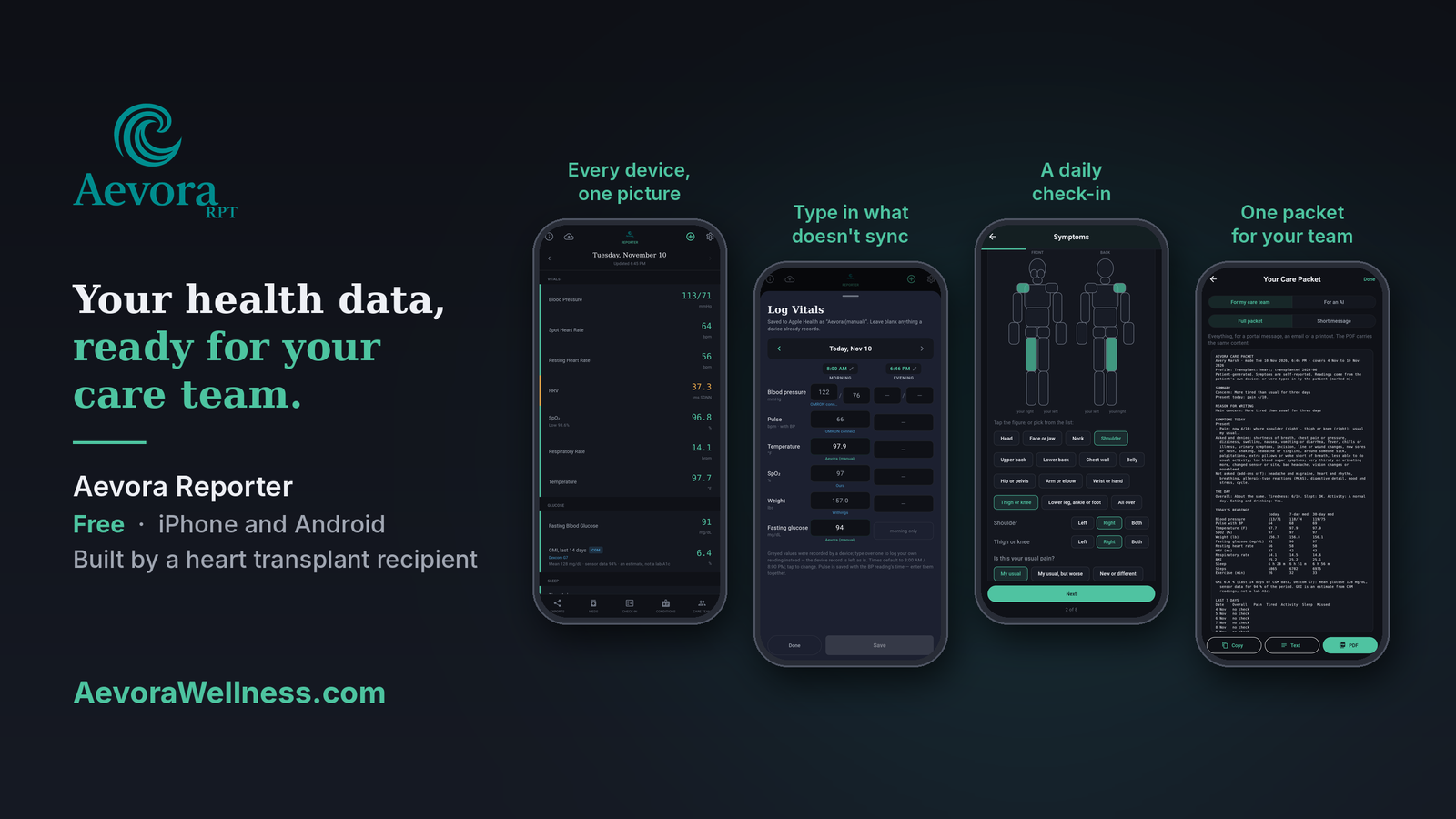
Eventually, I built Aevora Reporter, the first of the Aevora apps. It’s free, and it has one job: getting your health data into the hands of the people who need it. It gathers the readings your devices already collect—blood pressure, weight, temperature, heart rate, oxygen, glucose, sleep—and when a device doesn’t sync, you type the reading in yourself. It adds a short daily check-in in your own words and turns all of it into reports and messages your care team can read. If you use an AI assistant, it prepares a version for that, too. What it doesn’t do is interpret your readings, diagnose you, or give medical advice. Reporting is the whole job; the conversation about what the numbers mean stays between you and your team. It runs on iPhone and Android, it’s in testing now, and AevoraWellness.com has the details, including a complete guide to every screen in the app.
I built it for transplant recipients, whatever the organ—heart, kidney, liver, lung—and for people living with chronic illness such as Ehlers-Danlos syndrome. It works just as well for anyone managing their health alongside a care team, and for the caregivers who keep that record on someone else’s behalf, including adult children looking after an aging parent. People in both groups keep telling me the same story: they walk into an appointment knowing something is off, with nothing to show for it but how they feel, and the clinician says some version of “I really wish I had a week of your vitals.” Aevora puts that week in your hands.
That sheet was a sensible document. A printed grid is about the simplest way there is to collect those numbers, and I understood exactly why the team wanted every one of them. The trouble was the hand holding the pen.
Hands That Wouldn’t Hold Still
Tremor is one of the side effects that arrives early and stays. Tacrolimus is notorious for it—the Prograf prescribing information lists tremor among its most common adverse reactions—and MedlinePlus names steroids, cyclosporine and tacrolimus among the medicines that cause drug-induced tremor, with trouble writing, drawing, drinking from a cup and using tools at the top of its list of consequences. I was on high doses of both tacrolimus and prednisone in those first weeks. My hands shook badly enough that pills required tweezers, and a pen would put a digit somewhere in the neighborhood of the box meant for it; whether the digit was a 7 or a 1 was open to interpretation. The physical toll of that period is in The Fine Print and Coming Home, and the drugs themselves get their own treatment in All About Tacrolimus and All About Prednisone.
The logging was its own job on top of all that. My texts from the first days home are a running argument with the routine: asking how often I was supposed to check my vitals, losing the thermometer the nurse had given me and spending part of a morning hunting for it, and one message that sums it up—“I take vitals multiple times a day but log twice.” The readings got taken. Getting them onto the sheet was a separate chore, done with hands that weren’t cooperating.
Most recipients solve this the obvious way: a caregiver holds the pen. That’s the normal answer, and a good one. Mine was to take the pen out of the process entirely, which says more about how I’m wired than about what anyone should do.
Letting the Machines Keep the Log
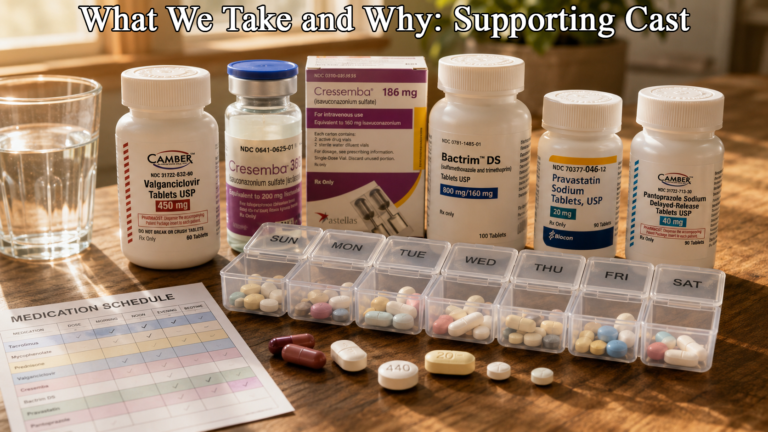
The first fix was hardware. A Bluetooth blood pressure cuff, a Bluetooth scale and a thermometer that syncs to an app took the transcription out of my hands; each reading went straight to Apple Health, timestamped and legible. That equipment, and why it matters, is covered in The Things You Need and What We Take and Why: Supporting Cast, and the current list of what I use lives on the What I Use page.
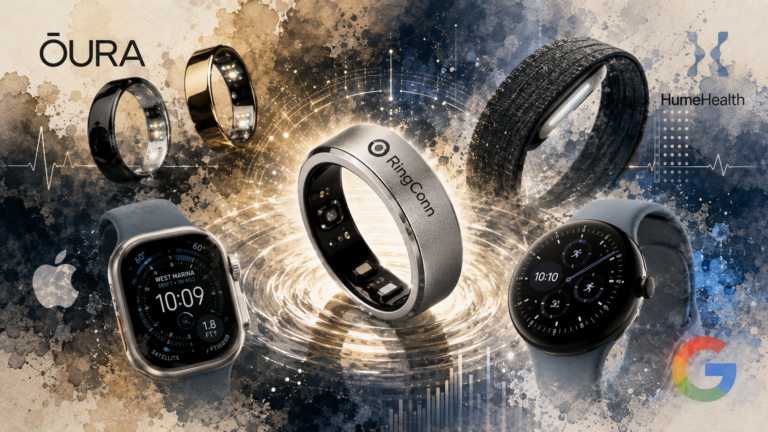
That solved recording. It didn’t solve reporting. Apple Health is very good at collecting readings and very poor at handing them back in a form a clinic can use. It shows one measurement at a time. Giving the team a week of morning and evening vitals meant opening each category, scrolling to each day and copying the numbers out—which put me back at the pen. Add a ring, a watch and a continuous glucose monitor, and the pile only gets taller, as I wrote in What Your Ring Actually Knows.
So, at the tail end of the winter of 2025, I wrote a small iPhone app for myself. It pulled the readings out of Apple Health and laid them out as a table, one row per day. It was rough, and it worked well enough that I kept adding to it. Aevora Reporter is that app, rebuilt to run on Android as well as iPhone and grown well past a table.
One Screen for the Day
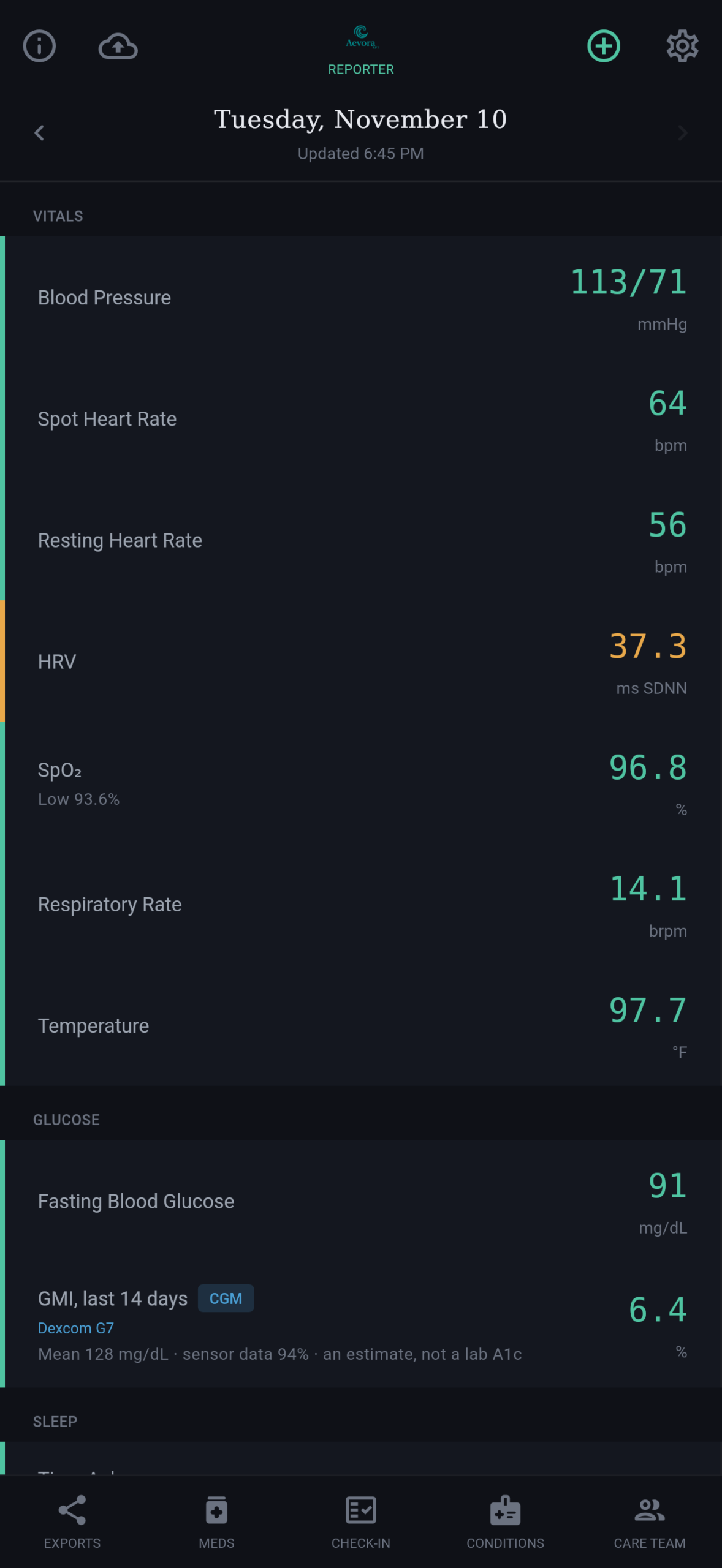
The Today screen puts the whole day on one page: vitals, glucose, sleep and activity, each showing its value and the device it came from. Swipe back through earlier days; pull down to refresh.
The less visible work happens underneath. Most of us have more than one device measuring the same thing—a watch and a ring both recording heart rate, a cuff and a watch both reporting a pulse. Apple’s own Health app settles those conflicts with a source priority list that, by default, puts readings you enter yourself first. Aevora works on the same principle, measurement by measurement. It scans what each device writes, ranks them for each reading, and uses the most trustworthy source for the report. The ranking is shown in Settings, and you can override it. A reading you type in yourself outranks every device.
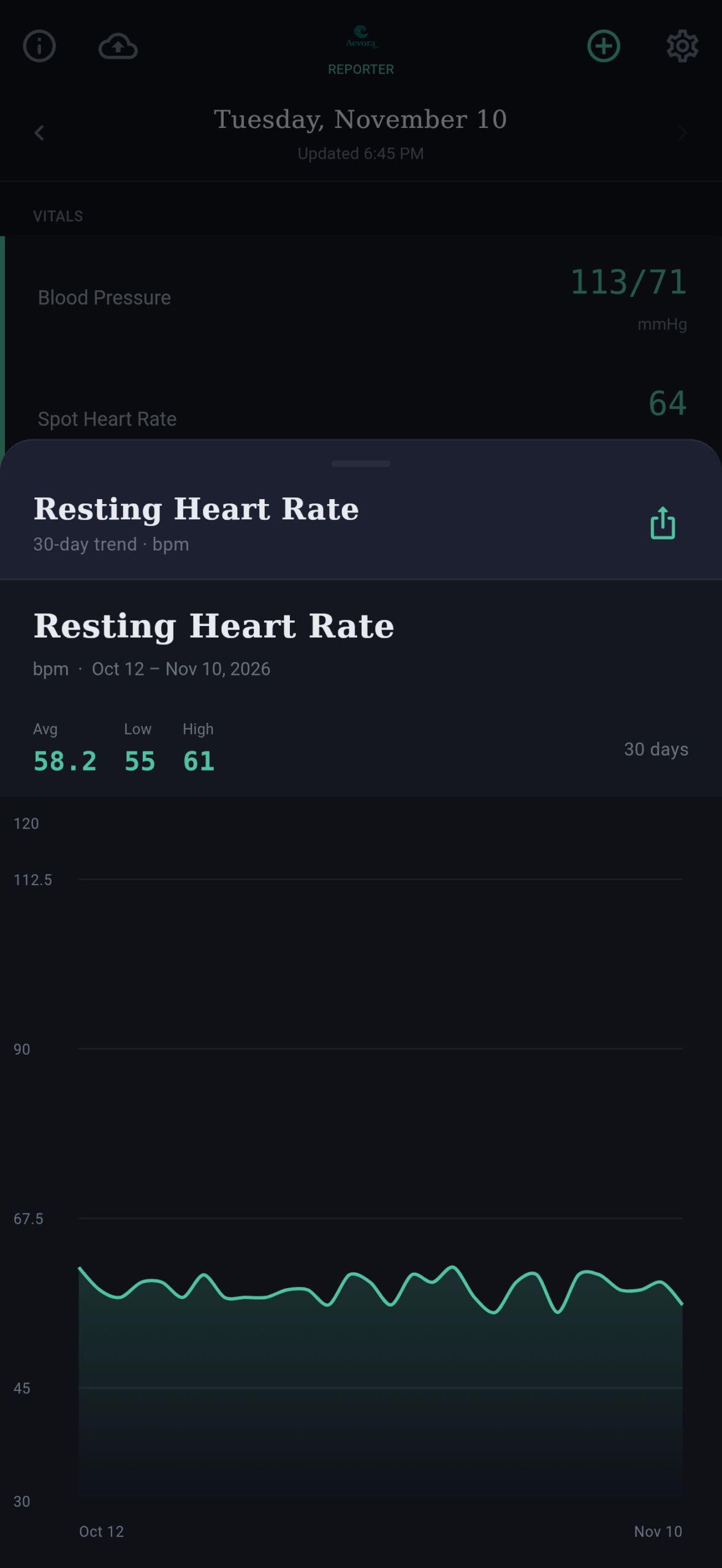
Tap any reading for its 30-day chart, with the average, low and high for the period. A single number on a single morning rarely tells you much; thirty of them, laid out as a line, show you where your usual sits. After transplant, your usual is the comparison that matters—a denervated heart doesn’t behave like anyone else’s.
For the Readings Nothing Sends
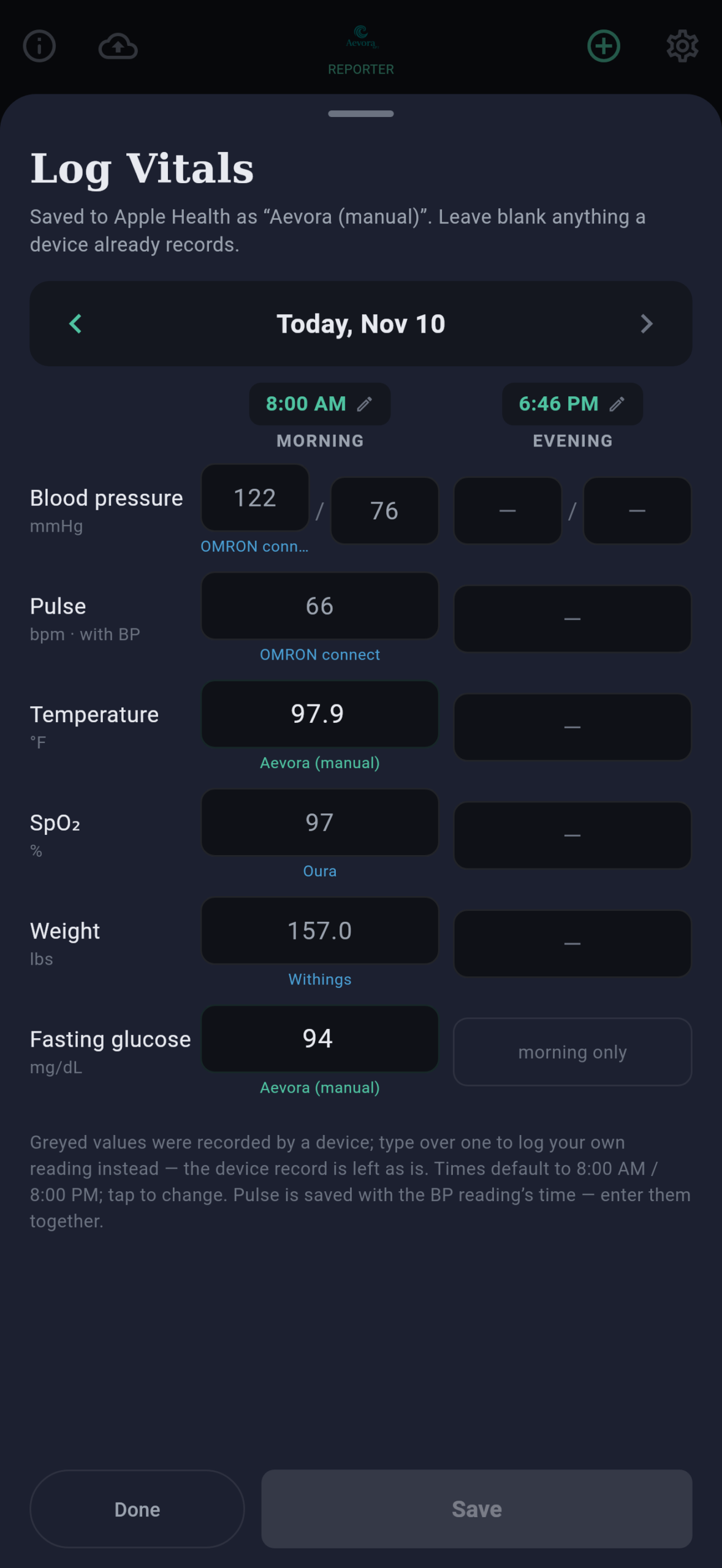
Not every device syncs. Plenty of good cuffs and thermometers have no app at all, and on Android the gaps are wider still. Log Vitals is for those readings. Tap the plus sign on the Today screen and you get one sheet per day with a morning column and an evening column: blood pressure, the pulse taken with it, temperature, oxygen saturation, weight, and fasting glucose in the morning.
Anything a device already recorded appears grayed out, so you only type what’s missing. Your entries are saved to Apple Health or Health Connect as your own readings; they appear in every report, and they stay in the health store even if you delete the app. You can edit or clear what you typed, and the app only ever changes its own entries, never a device’s.
It’s the same sheet the team sent home with me, with one difference that mattered in month one: a shaky finger lands on a number field far more reliably than a shaky pen lands a digit in a box.
How You Are, in Your Own Words
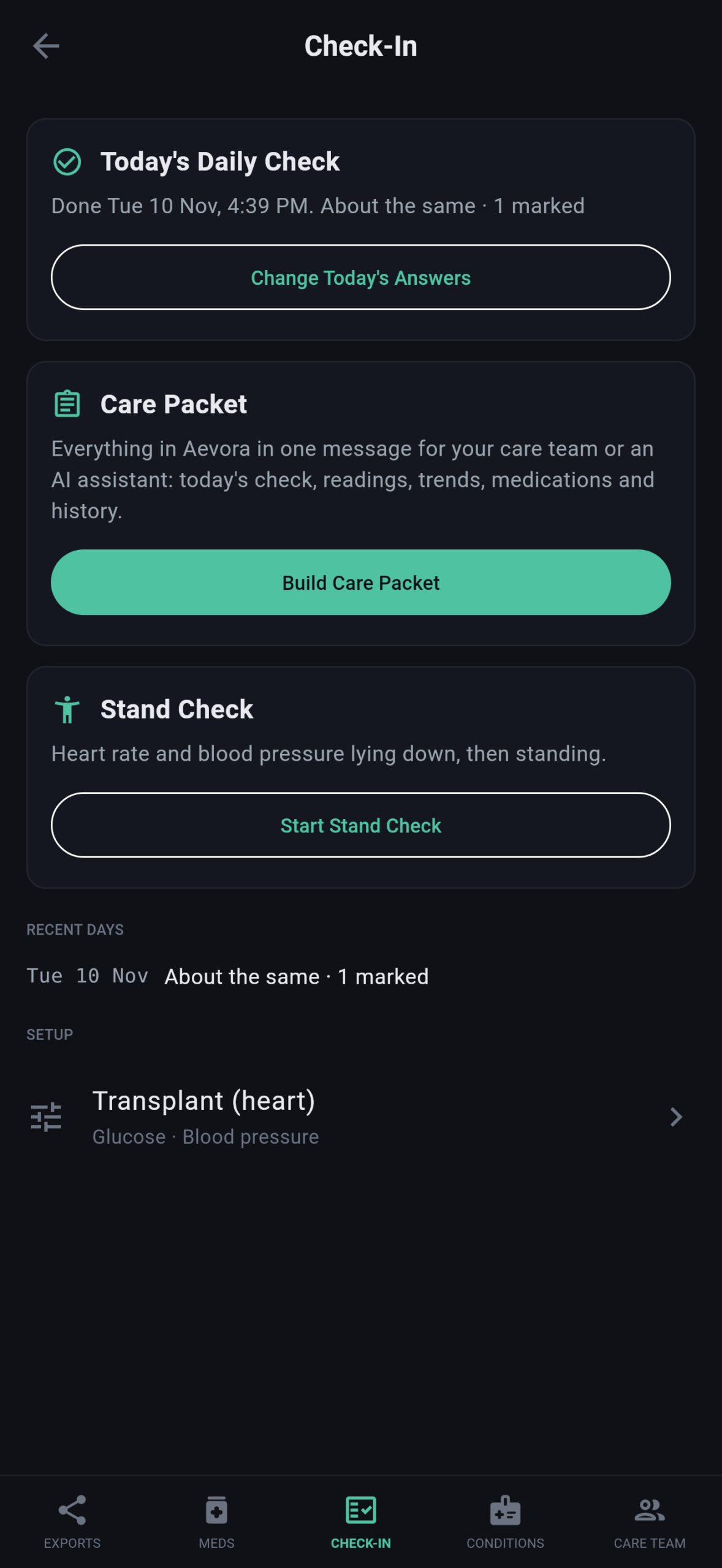
The numbers are half of what the team wants. The other half is the question every clinic visit opens with—how have you been?—and by the time you sit down to write a portal message, Tuesday’s details have usually blurred into Thursday’s. The Check-In, the middle button at the bottom of the screen, keeps that half of the record day by day.
Setup takes a few minutes, once. You choose a profile. Transplant covers any organ: you enter the organ or organs and your transplant month, mark which of your medications are anti-rejection drugs, and set a fluid goal. EDS complex is for people living with Ehlers-Danlos syndrome and related conditions. General is for anyone who simply wants a daily record. Nine optional add-ons cover headache and migraine, glucose, heart and rhythm, blood pressure, breathing, allergic-type reactions (MCAS), digestive detail, mood and stress, and the menstrual cycle.
You also enter your call-us numbers. These come from your team: the thresholds they gave you for when to call about temperature, weight gain in a day and in a week, blood pressure and resting heart rate, plus FEV1 for lung recipients. Your team’s numbers are the ones that count. To save typing, temperature, daily weight gain and blood pressure come pre-filled with common transplant instructions, and until you change them, those defaults bring up the same notice your own numbers would—so set them to what your team actually told you. Weekly weight gain is left blank for you to fill in, because programs differ.
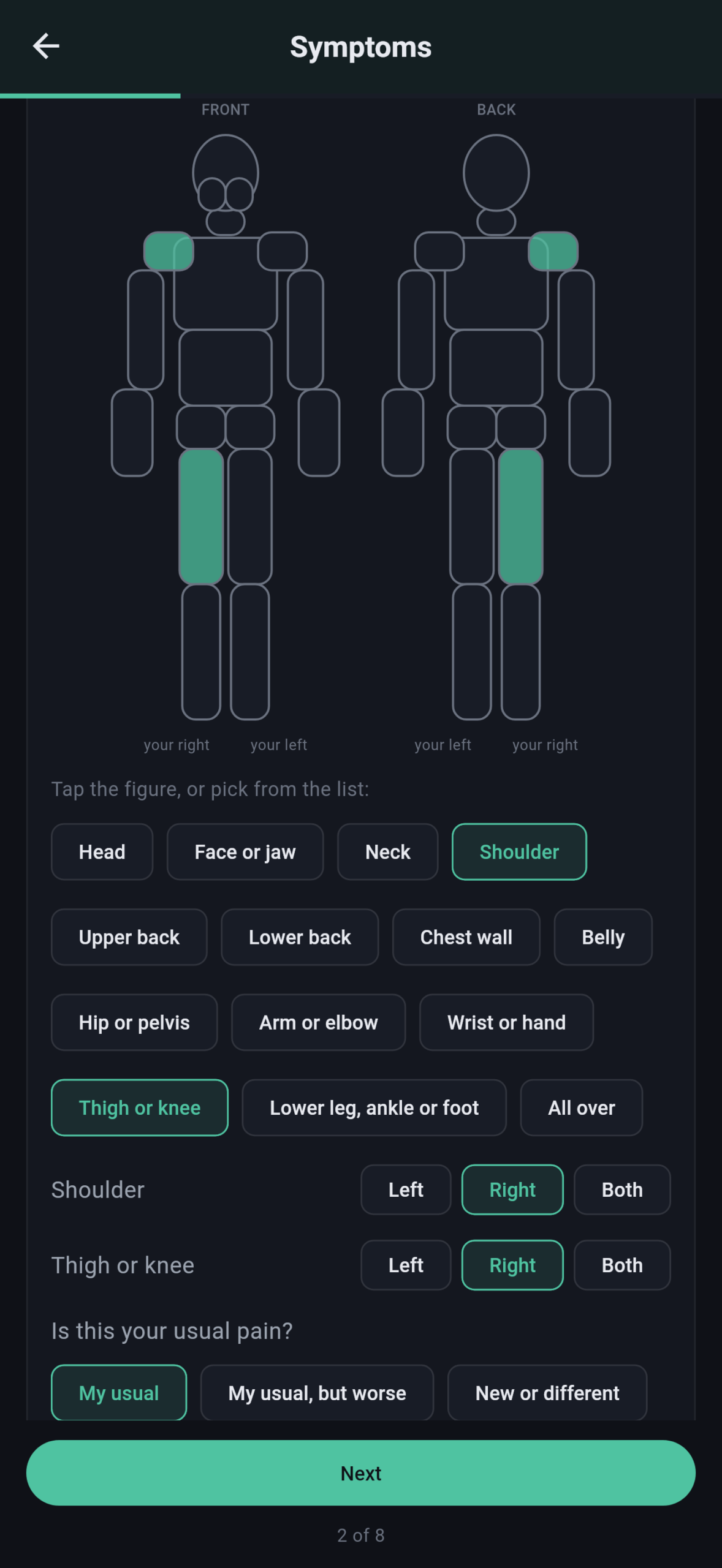
The Daily Check itself takes a minute or two, almost all of it taps: how you are compared with your usual, symptoms, tiredness, sleep, activity, eating and drinking, how your medications went, then whatever your profile and add-ons ask. Pain goes on a body figure, front and back, with a side where there is one, a 0-to-10 level, and whether it’s your usual pain or something new. Each symptom is asked only once, even when the profile and an add-on both cover it. You can reopen the day and change an answer.
One detail matters more than it looks. The symptom screen is answered by tapping what applies or tapping “None of these,” which lets the record tell “asked, and said no” apart from “never asked.” That’s the distinction a clinician reading it needs to make.
Some answers trigger a notice. Mark chest pain or pressure, passing out, blood or black stools, confusion, the worst headache of your life, a device alert or shock, or a handful of other red flags, and the app shows a fixed message: call 911 if it feels like an emergency, otherwise call your care team now. A reading past one of your call-us numbers brings up the same kind of notice and a banner on the Check-In tab. There are ten notices, their wording never changes, and the app makes no judgment about how serious anything is. It’s a reminder, not a triage nurse.
The Check-In tab also holds a stand check: heart rate and blood pressure lying down, then standing at one, three and ten minutes, with how you felt at each step. The report shows the readings and the rise in heart rate. It doesn’t name a condition.
One Packet for the Team
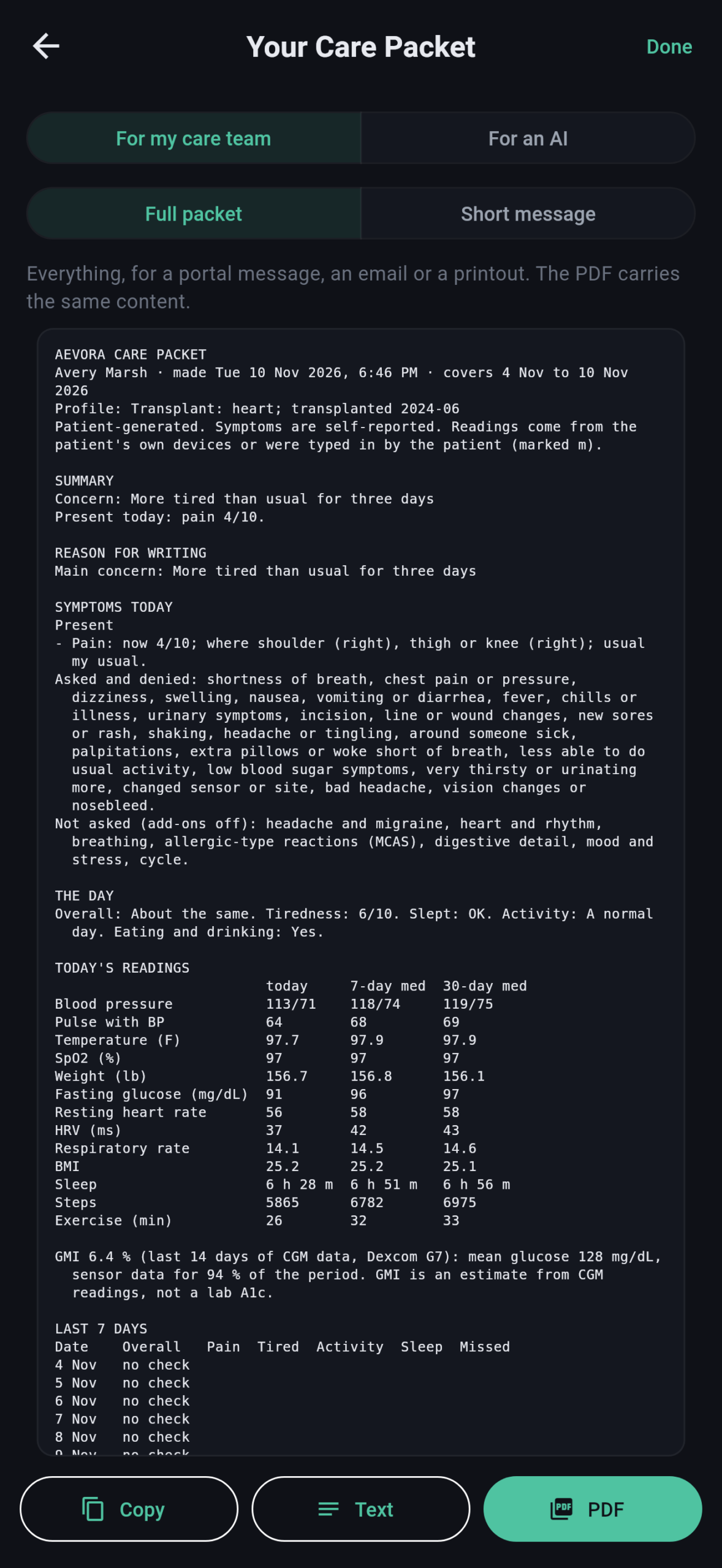
When something feels off and you need to write to the team, Build Care Packet does the assembling. It starts with a short interview—who it’s for, what period it covers, whether there’s a concern, when it started and how it has gone, what you’ve tried, and what you want from the team—and asks for more detail only about what you marked today.
Then it puts everything the app holds into one document: a summary; your reason for writing; the symptoms you have, the ones you were asked about and denied, and what wasn’t asked; today’s readings beside your own 7-day and 30-day medians, with anything past a call-us number marked; a trend table for the period; your medications, with the anti-rejection drugs marked and any late or missed doses noted; your profile and add-on answers; the stand check; your own words; and your basic details, conditions, allergies, care team with phone numbers, call-us numbers, and where each reading came from.
Here’s what that looks like in practice. Avery, the sample patient in the screenshots, has felt more tired than usual for three days. Nothing dramatic: no fever, no chest pain, readings that look roughly normal at a glance. Without a packet, the portal message would read something like “I haven’t felt right this week,” and the coordinator’s first reply would be a request for numbers. With one, the reason for writing says more tired than usual for three days. Today’s check puts the tiredness at 6 out of 10, with Avery’s usual pain and nothing new. The symptom list shows that shortness of breath, swelling, fever and the rest were asked about and denied. Blood pressure, pulse, weight and temperature sit beside Avery’s own 7-day and 30-day medians, and the medication record shows whether any anti-rejection dose was late or missed. The team gets the complaint and its context in the same message, before anyone picks up the phone.
There are three forms for the care team: the full packet as a PDF, the full packet as text, and a short version sized for a patient portal’s message box. A fourth is written for an AI assistant, if you use one—the same packet with a request attached asking what stands out against your own usual, how the symptoms and readings fit together, what to watch, what to ask the care team, and when to call, along with an explicit instruction not to diagnose and not to advise on medication. Before you share a packet the first time, the app tells you that sharing means it leaves your phone. A copy of each packet is kept in your Aevora folder.
Paper the Clinic Can Use
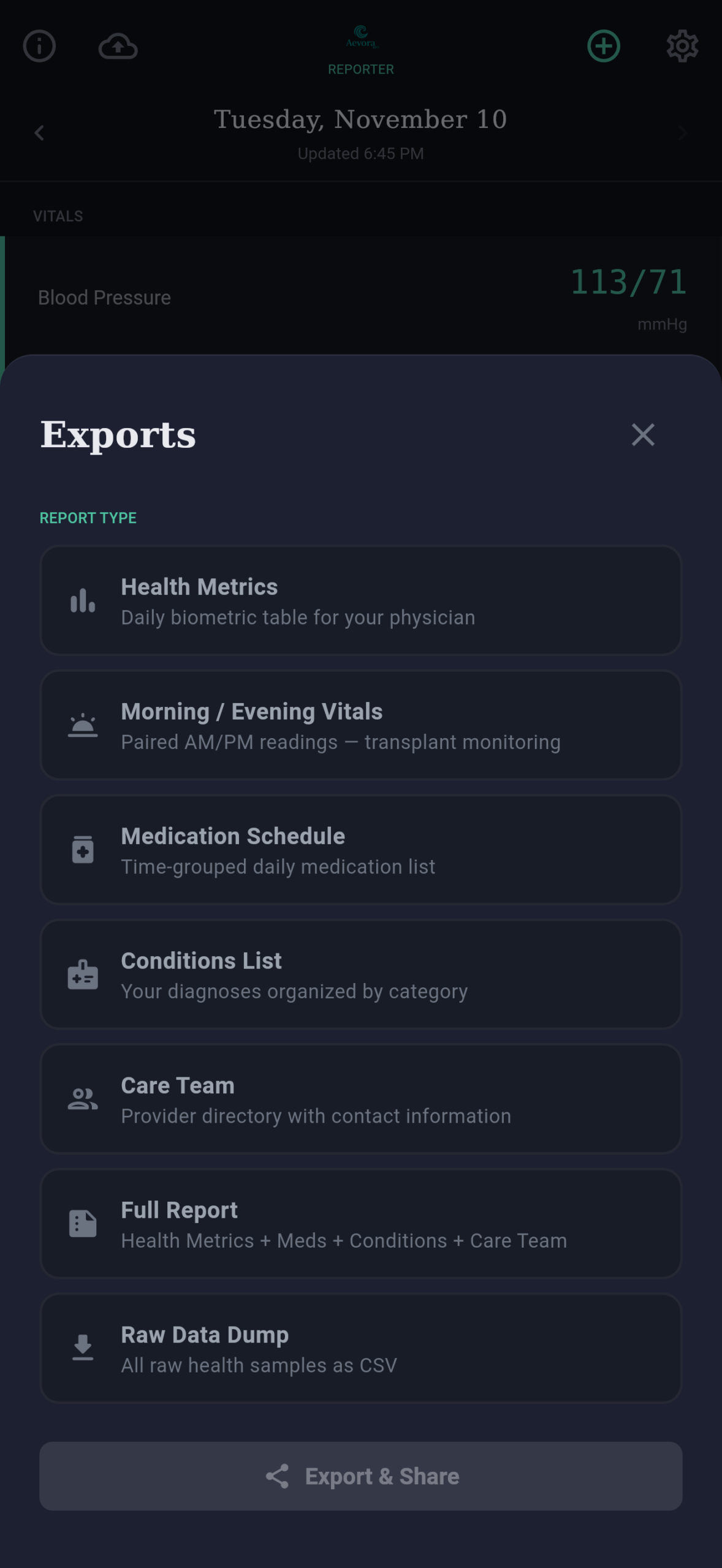
The reports are what that first app was for, and they’re still the backbone. They are also the week of vitals a clinician asks for, ready before anyone has to ask. Health Metrics gives one row per day for up to 30 days, as a PDF, an image or a spreadsheet file. Morning/Evening is the twice-daily vitals log my team asked for, with each pulse paired to the blood pressure reading it was taken with—the paper sheet, filled in by the phone. There’s also a printable Medication Schedule grouped by time of day, a Conditions List, a Care Team contact page, and a Full Report that combines them. For anyone who wants everything, the raw export dumps every sample the health store will share into a spreadsheet file. Reports go out through your phone’s share sheet—a MyChart upload, an email to the office, a printer—and a copy lands in your Aevora folder.
If you wear a continuous glucose monitor, the Today screen, the Health Metrics report and the Care Packet also show your 14-day Glucose Management Indicator, with your mean glucose and how much of the period the sensor covered. GMI is the term the field settled on for an A1c estimate calculated from CGM data—deliberately not called “estimated A1c”, because it doesn’t always match a lab A1c drawn at the same time. The app shows it only when the sensor covered at least 70 percent of the 14 days, the threshold set by the international consensus on CGM metrics; below that, it tells you how much data it has. Everywhere it appears, it’s labeled as an estimate, not a lab result. The sensor is recognized automatically, so changing sensors needs no setting. Why any of this matters after transplant is in Glucose Management After Transplant.
The Rest of the Record
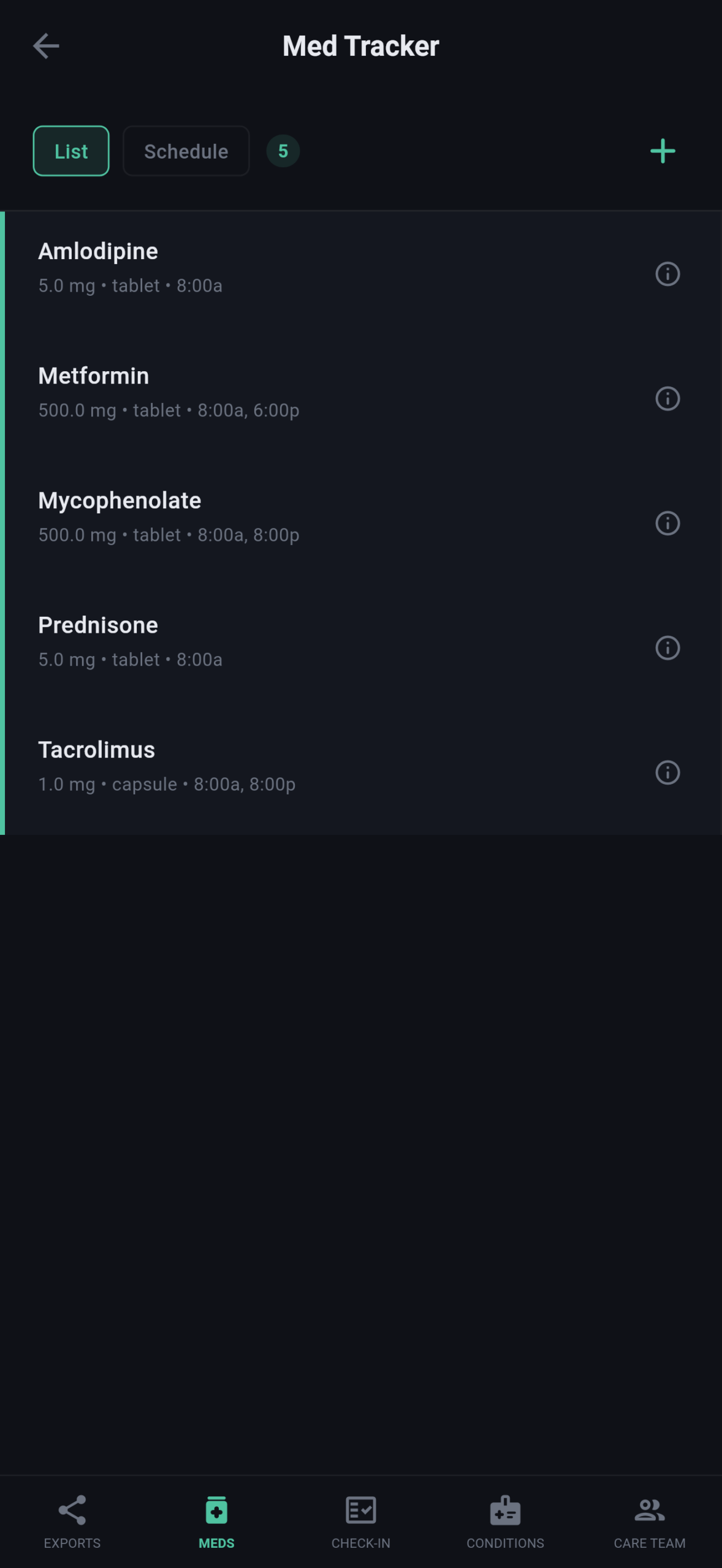
The supporting records are the ones you’d otherwise rewrite on every intake form. Medications can be searched by name against the National Library of Medicine’s drug database or typed in, each with its strength, form and a schedule by time of day, and the FDA label opens from the entry. Conditions come from categorized lists that include the transplant types; allergies cover food, environmental and drug, plus anything you want to type. Care team members can be found through the national provider registry or entered by hand, with specialty, practice, phone and fax.
All of it lives in one Aevora folder you choose once—in iCloud Drive on iPhone if you like, and on Android in Documents/Aevora by default, with Google Drive as an option. Backup is one tap from the home screen and keeps the newest five. A backup restores on the same phone or a new one, and a backup made on an iPhone restores on Android.
Nothing Leaves Unless You Send It
If you remember one thing about Aevora’s privacy, make it this: nothing leaves your device unless you send it. Your readings, your answers and your reports stay on your phone. Nothing is sent to me or to anyone else. There’s no account to create, no ads, no subscription and no tracking. Your data leaves the phone only when you share or save a report or a packet, and the app tells you so before the first share. One choice at setup is yours as well: if you put your Aevora folder in iCloud Drive or Google Drive, your backups and saved reports go to your own cloud account, because you put them there. Keep the folder on the phone, and they stay on the phone.
The only network traffic is the search itself. When you look up a medication or a provider, the text you type goes to public U.S. government databases—the National Library of Medicine’s RxNav, openFDA and the CMS NPI Registry—with no identifier and no health reading attached.
The app doesn’t send anything to your clinic on its own, either; you decide what goes out and where. It doesn’t interpret your readings, score you, diagnose you or offer treatment advice. It compiles and reports.
Why It Costs Nothing
Aevora Reporter is free. There’s no price, no subscription, no ads, no premium tier waiting behind the free one, and no account to create. That’s deliberate, and it’s permanent: the app will not start charging down the road, it will not carry ads, and nothing in it will go behind a paywall.
Transplant doesn’t end at discharge, and neither do the bills. The anti-rejection medications are for life, the labs and clinic visits keep coming, and so do the drives to get to them. People living with chronic illness know the same arithmetic, and so do the caregivers carrying it alongside them. A way to report your own numbers to your own team shouldn’t add a line to that budget.
This is a passion project. I built the first version because I needed it, and I’ve kept building it because the people in the transplant and chronic-illness communities I’m part of need it too. Making it free is the simplest way to make sure the people who need it most can actually use it.
The only money any of this will ever earn me is the small commission when someone buys a device through one of my affiliate links. That’s it. The app costs nothing, and your data isn’t for sale.
iPhone, Android, and the Devices Between
Aevora doesn’t connect to devices directly. It reads Apple Health on iPhone and Health Connect on Android, so any watch, ring, cuff, scale, thermometer or glucose sensor that shares with those is covered without a separate integration.
On iPhone this is easy: most health devices send their readings to Apple Health. On Android the equivalent is Health Connect, which stores data on the phone and shares it between apps with your permission—and far fewer devices write to it. Here’s what’s known so far. Oura shares heart rate, heart rate variability, sleep and steps with Health Connect, and the Google Pixel Watch shares the same basics. Samsung watches share only after permission is turned on inside Samsung Health. Blood pressure, weight, temperature and glucose are where Android is thin, which is exactly why Log Vitals exists. The site’s Devices page keeps the current list for both platforms. Two smaller limits worth knowing: on iPad, the data is whatever iCloud has synced from your iPhone, and on Android, data doesn’t sync between devices.
If you’re on Android, you can help fill in that map, and it takes about a minute. Open Settings, search for “Health Connect,” and tap “App permissions” to see which apps are listed. Then tap “Browse data” (it may be under “Data and access”) to see which kinds of data have anything in them. Email what you find to info@deepdarkabyss.com. It tells me more than the box the device came in.
These are the devices I use myself that send their readings to Apple Health:
- Omron blood pressure cuff
- Withings scale, or the lower-priced Etekcity scale
- Kinsa thermometer—the only decent thermometer I’ve found that shares its readings
- Pulse oximeter
- Wellue O2Ring-S, the overnight oxygen ring
- RingConn Gen 3
- Oura Ring Gen 5
- Hume Band v2
- Apple Watch Series 11
- Dexcom G7 glucose sensor, through your prescriber
On Android, the Google Pixel Watch 4 is the one I’ve confirmed. Some of these are affiliate links; I earn a small commission if you buy through them, at no cost to you. The full list of what I use is on the What I Use page.
Testing, With Company
Aevora Reporter is in testing on both platforms—through TestFlight on iPhone and iPad (iOS 18 or later), and through Firebase App Distribution on Android phones (Android 8 or later, with Health Connect). It isn’t in the App Store or on Google Play yet. Testing is where it gets shaped. I’ve been my own first user since that first table, but one patient is a sample size of one.
What I want most is to hear from recipients, caregivers and the clinicians who read these reports about what the Check-In should ask: what’s missing, what’s noise, what a team would actually want to see in a packet. If your portal has a message box, tell me whether the short message fits it. If you wear a CGM, compare the app’s GMI and mean glucose with the 14-day figures in your sensor’s own app, and send me both numbers.
There’s no support desk between you and the app. Mail sent through the beta button comes to me, the person who writes the code, and suggestions from patients and their teams are what decide what gets built next. I can’t answer medical questions, but anything about how the app works, what it gets wrong, or what it should do is exactly what I want to hear.
To join, go to AevoraWellness.com and tap Join the Beta. It opens an email requesting an invitation; include your phone type and one email address. For iPhone, that’s the email on your Apple ID, shown at the top of Settings when you tap your name. For Android, it’s the email on your Google Play account: open the Play Store and tap your picture in the upper right corner. The invitation goes to that address, so it has to be the one your phone uses. Once it arrives, the site’s How to Get It page walks through installing from TestFlight or Firebase App Tester, and the Aevora Reporter guide covers everything after that, screen by screen.
The team still gets its morning and evening numbers. Nobody has to hold the pen.
Discover more from One More Beat
Subscribe to get the latest posts sent to your email.

Hi, what a great resource! Thank you. I’m just being assessed for transplant here in Australia. I wanted to ask, as all my readings would be in metric, is there a toggle for each of those measurements?
Best of luck with it.
Kevin
Thank you, and good luck with your transplant assessment! Yes, there’s a metric setting. It’s one switch for weight, temperature and height, so those show in kilograms, Celsius and centimetres throughout the app. You can choose metric during setup or switch to it anytime in Settings.
Blood glucose still displays in mg/dL, so I’m adding mmol/L for exactly this reason. Aevora is still in testing, and I built it around U.S. conventions in a few places. If you try it, I’d love to hear what else doesn’t fit for you in Australia.